Import Your Travel History From Files
Rolling rules like Schengen 90/180 and the 183-day rule need your past days. Give iReside a file or a photo and it lists the trips in it for you to check, so you do not retype your travel history.
How do I import my past travel into iReside?
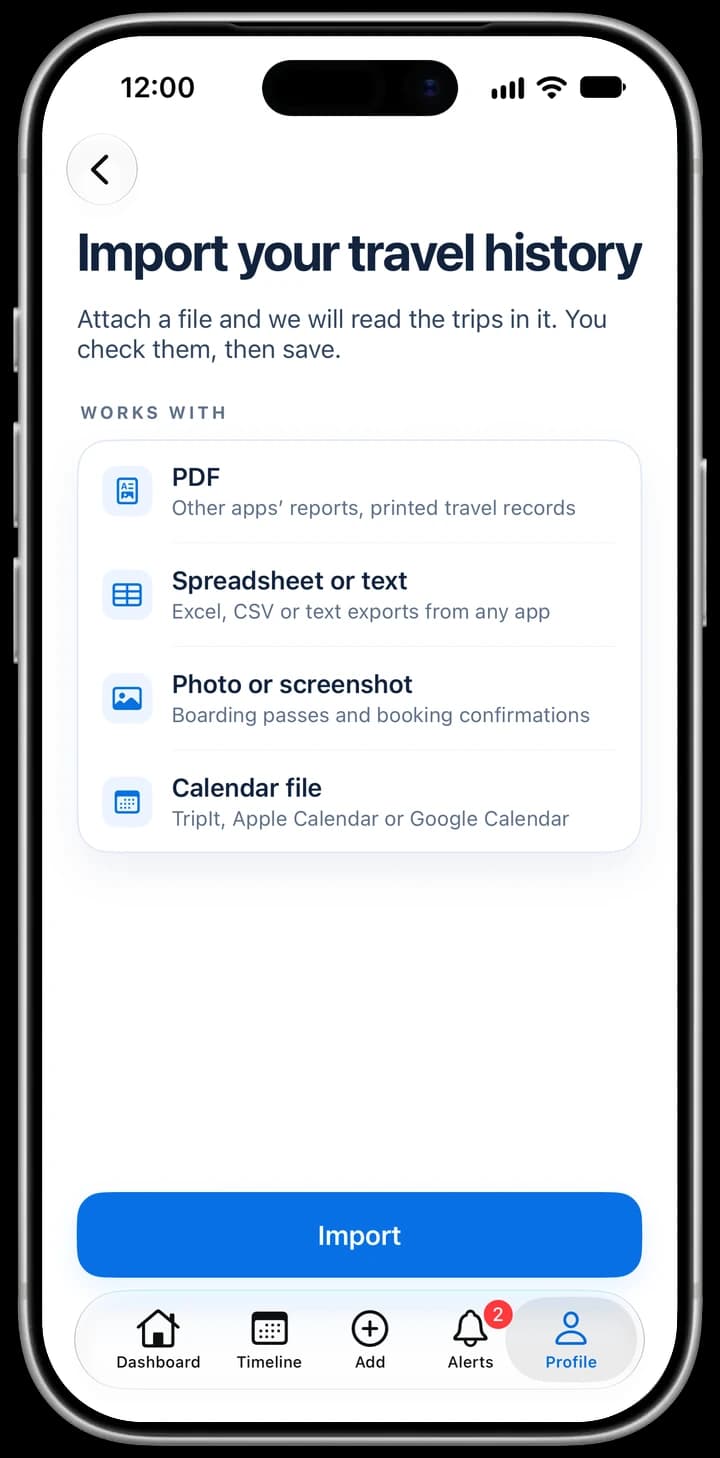
Open Import Travel Data in iReside and choose a PDF, a spreadsheet, a calendar file, pasted text or a photo of a boarding pass or booking. iReside lists the trips it finds. You check, edit or remove each trip, and nothing is added to your timeline until you save.
Travel data import is a Premium feature: it needs an active iReside subscription. Days you added by hand or imported earlier stay as they are.
$44.99/year after free trial. Cancel anytime.
How travel data import works
Four steps, and you decide what is saved.
Choose a file or photo
In Import Travel Data, pick a file, pick a photo, or paste text. Nothing needs to be renamed or reformatted first.
iReside reads it
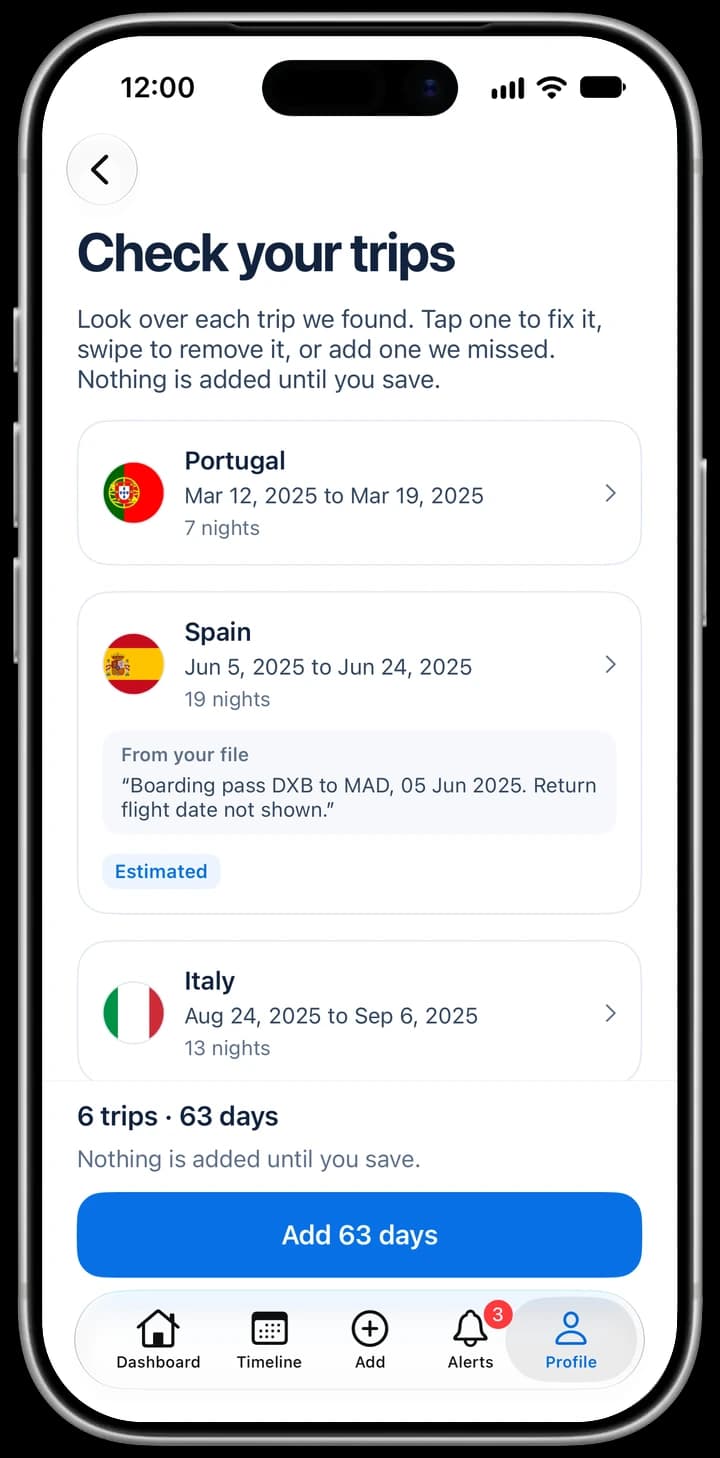
It looks for dates and places, puts the trips in order and shows how many it found, with each trip's country, region, city and dates.
Check every trip
Edit a trip, remove it, or add one the file missed. Trips that need a second look are marked Estimated, Check this or Overlaps another trip.
Save to your timeline
Nothing is added until you save, and Undo is there if you change your mind. The days appear in your timeline, trackers and reports.
What you can import
Anything that lists where you were and when. These are the file types the Import Travel Data screen accepts.
Other apps' reports and printed travel records. Up to 30 pages.
Spreadsheet or text
Excel, CSV or text exports from any app, or text you paste in.
Calendar file
TripIt, Apple Calendar or Google Calendar exports (.ics).
Photo or screenshot
Boarding passes and booking confirmations.
Files can be up to 10 MB. Fair-use limits apply per day and per month.
Review, then save. Your tracked days are safe.
A messy file can be misread, so the import never saves for you. Every trip is shown for you to confirm, and the rest of your timeline is protected.
- Edit or remove any trip before it is saved
- Days tracked with GPS are never replaced
- Where a day clashes with an existing entry, choose Keep mine, Use file or Keep both
- A Couldn't import list shows cancelled trips, other people's trips and rows with no date or place
- Add a skipped entry yourself, with what could be read already filled in
- Future trips are added as planned days
Why your past days matter
Rules that look back, like 90 days in any 180 or 183 days in a tax year, are only as right as the days behind them. Importing last year's trips lets iReside count the window from day one instead of from the day you installed the app.
Travel data import questions
What file types can iReside import?
PDFs (up to 30 pages), spreadsheets and text files such as Excel and CSV, calendar files (.ics) from TripIt, Apple Calendar or Google Calendar, pasted text, and a photo or screenshot of a boarding pass or booking confirmation. Files can be up to 10 MB.
Will an import overwrite days iReside tracked by GPS?
No. Days tracked with GPS are never replaced. If an imported day clashes with a different place already in your timeline, you choose Keep mine, Use file or Keep both, and a replacement asks you to confirm first.
How accurate is the import?
It reads dates and places well from clear files, but it can misread a messy one. That is why every trip is shown for you to confirm, and trips it is unsure about are marked Estimated or Check this before you save.
What happens to entries iReside cannot read?
They go to a Couldn't import list instead of disappearing, with a short reason such as a cancelled trip, someone else's trip, or no date or place in the file. You can add any of them by hand.
Can I import flights from TripIt or Google Calendar?
Yes. Export your trips as a calendar file (.ics) from TripIt, Apple Calendar or Google Calendar and choose it in Import Travel Data.
Is travel data import free?
No. It is a Premium feature and needs an active iReside subscription. Days you added by hand or imported earlier stay as they are.
Related
- Document Vault: keep the proof behind your days
- Visa tracker and Schengen calculator app
- Free Schengen 90/180 calculator (no sign-up)
- Free 183-day state residency calculator
- Tax residency and visa tracking FAQ
- Best residency tracker apps compared
iReside counts days and keeps records. It is not legal, immigration or tax advice.