Tax Residency Tracker & Visa Tracker AppProof of Where You Were,
Every Day.
iReside is the best tax residency tracker app for auditable proof of where you were. It counts your days by GPS in every US state/city/territory and every country, warns you before the 183-day rule, the Substantial Presence Test, Schengen 90/180 and many more, and keeps audit-ready proof for a tax department or immigration officer. Built for snowbirds, expats, digital nomads, remote workers, business travelers, retirees with homes in two states, people moving to a new state or country, and anyone on a visa.
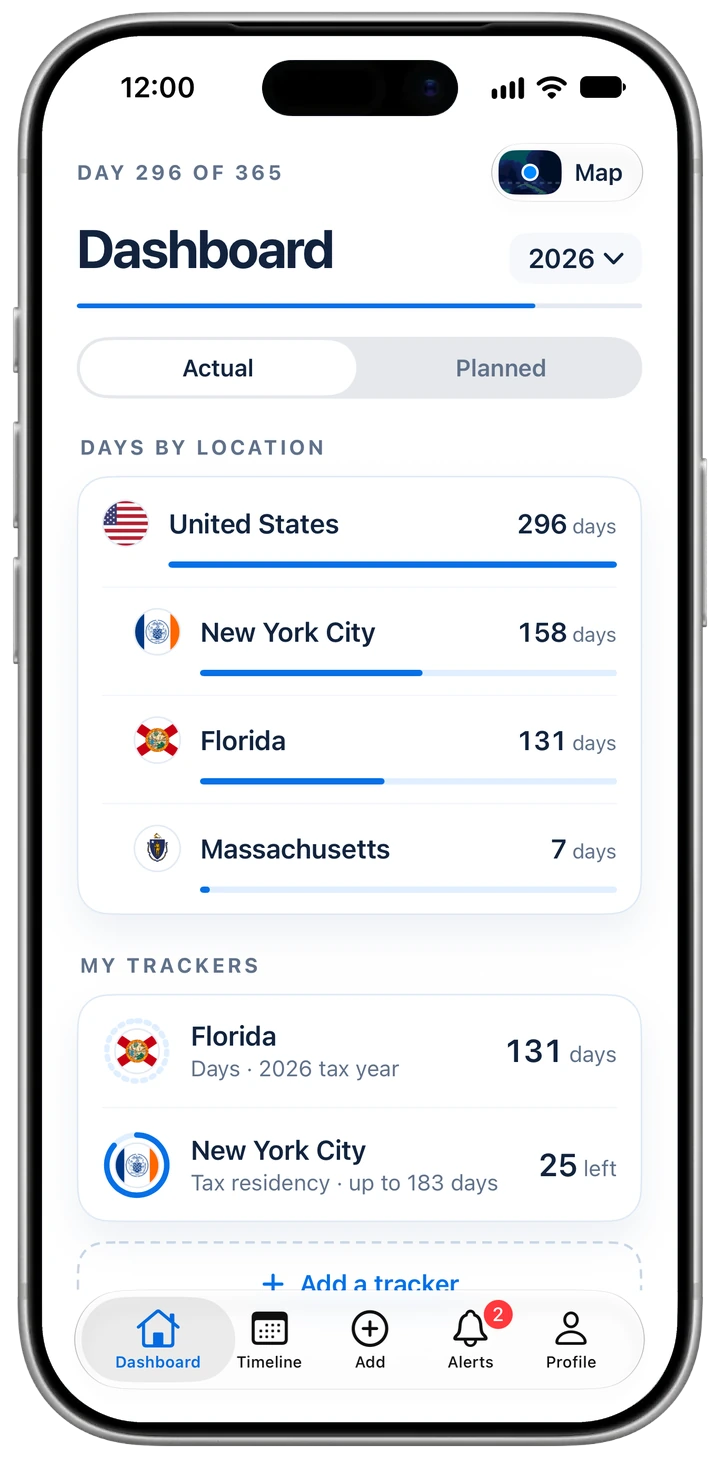
What is a tax residency tracker app?
A tax residency tracker is an app that records which state or country you were in each day and totals those days against residency rules like the 183-day rule. iReside is a tax residency tracker app for iPhone that counts your days automatically by GPS, with nothing to log by hand.
How does a tax residency tracker count days?
By default, iReside counts a day in each US state, Canadian province or country where you were at any time on a calendar day, and can apply a place's own counting rule in settings. A travel day counts once in each place you were in. By default, states you only fly over are ignored, and your origin, destination and layovers are counted. You can edit any day in the timeline, or fill in earlier days from your photos, and your recorded days always take priority over photo days.
Tax residency tracking software, day counter and alerts
As tax residency tracking software and a tax residency day counter, it shows days used and days left against each rule you add, such as the 183-day rule, the US Substantial Presence Test or Schengen 90/180, and warns you before you reach a limit. It records the days you were present, not which were work days, and it is not tax advice. It is built for Canadian snowbirds and digital nomads, among others.
Built for the Questions an Auditor Asks
Where were you, on which days, how do you know, and what documents back it up? iReside builds the answer as you go.
Accurate by Design
Days are counted automatically by GPS, with nothing to log by hand. By default, fixes taken in flight never create a day, each day is pinned to the local date where you were, and each place's own rule decides what counts.
Audit-Ready Proof
A day-by-day record as a PDF or a CSV: every day with its location, its source (GPS Tracked, Manually Tracked, From a Visit or Planned Location), reasons, notes, and documents.
Gap Checks & Alerts
iReside finds days with no location and asks "Where were you?" by notification, which you can answer from the lock screen. Alerts arrive as you approach a limit, including 30, 7 and 3 days before.
Import Travel Data
Rebuild past years from your photos, or drop in itineraries, booking confirmations, calendar files, spreadsheets, PDFs or screenshots. You review every trip before it is saved, and your recorded days always come first.
Learn moreDocument Vault
Keep passports, visas, permits, boarding passes, entry stamps and receipts tied to the days they prove. Your report can index them as numbered evidence, and each day cites the documents behind it.
Learn moreEvery state, province & country, counted by its own rule
iReside counts your days across US states and territories, Canadian provinces and countries, following each place's own rule for what makes a day. A day in two places counts for both, and your report marks it as a travel day.
- US states & territories
- Canadian provinces
- 307 jurisdictions, each rule with its official source
- GPS-tracked, nothing to log by hand
A Residency Report for the Questions an Auditor Asks
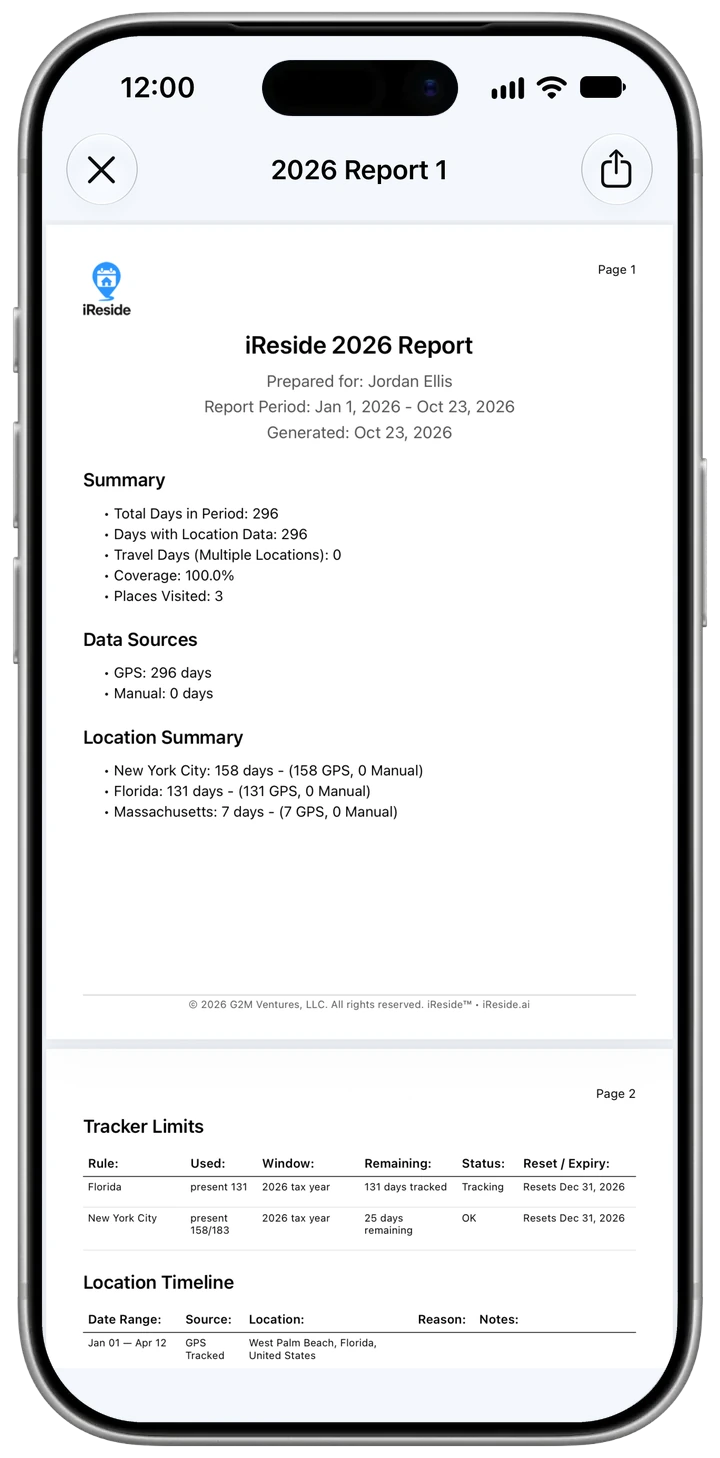
iReside exports a PDF or CSV for any date range that answers where you were, on which days, how you know, and what documents back it up.
iReside reports have already been accepted in several successful residency audits. Hand yours to your CPA or lawyer, or to the authority asking. It is evidence of where you were, and the CSV is a version of the report for your accountant's spreadsheet, with a separate day-by-day travel history CSV.
Day-by-Day Location Timeline
Every run of days with its source label (GPS Tracked, Manually Tracked, From a Visit or Planned Location), place, reason and notes.
Data Sources & Coverage
How many days came from GPS and how many from manual entries, a Location Summary per place with its own GPS and manual split, and your coverage percentage.
Missing Days
Gaps are shown, not hidden. Days with no location are listed, so the report is honest about what it does and does not cover.
Limits & Documents
A Tracker Limits table (used, window, remaining, status), a Substantial Presence Test section and an optional index of your passports, visas and boarding passes, numbered E1, E2 and cited by the days they support.
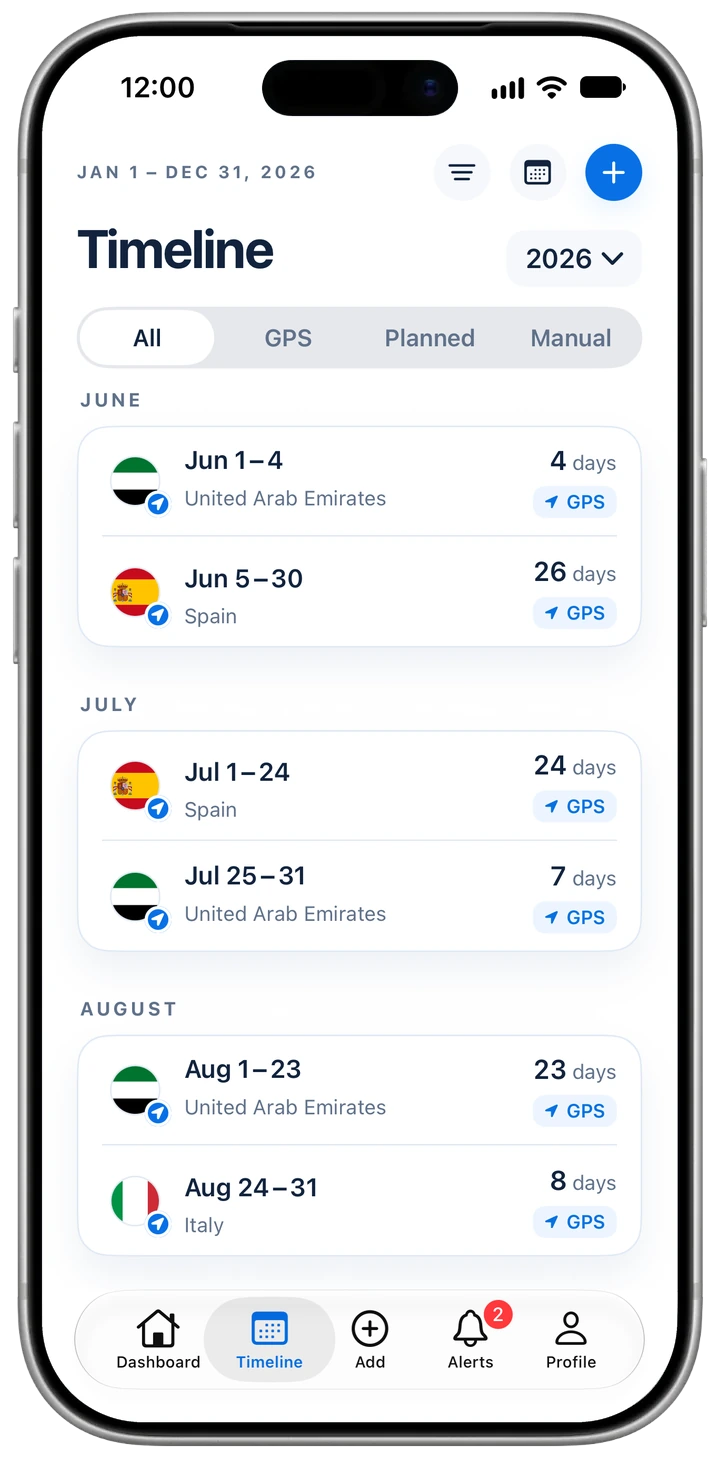
A timeline that shows where every day came from
A chronological view of where you were, with each entry marked by its source. Trips are grouped, travel days are split out and every segment has its own day count.
- Grouped trips & travel days
- Per-segment day counts
- Filter by GPS, planned, or manual
- Edit or correct any entry
Know your limits before a border officer asks
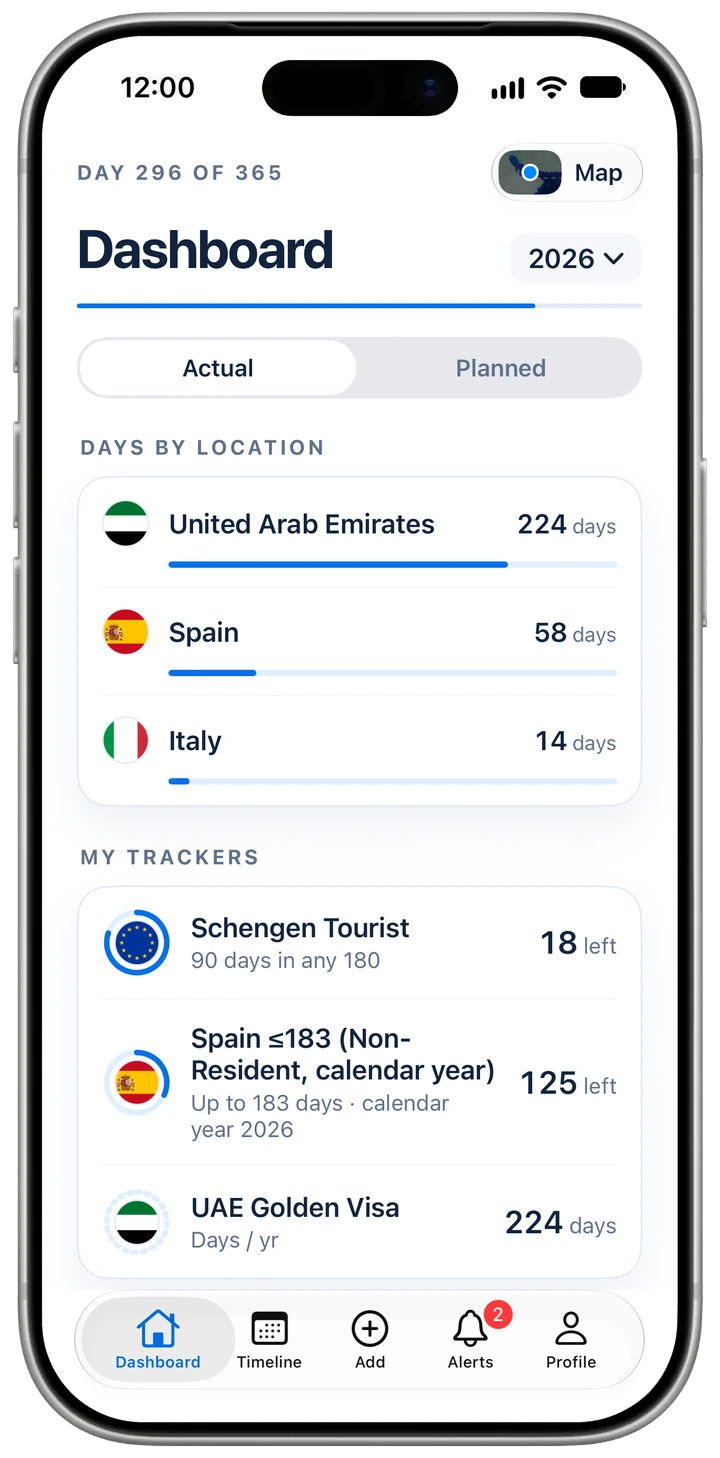
Add a tracker for a visa, residency or citizenship rule and iReside counts against it as you travel, so you can see days used and days left before you reach the limit. Schengen 90/180, Canada PR, US naturalization and UK settlement are ready to pick.
- Days by country at a glance
- Days used and days left per tracker
- Rolling windows like 90 days in any 180
- 130+ ready-made trackers for visa, residency & citizenship rules
Never overstay a visa again
The same automatic day tracking that builds your tax residency record also tracks your visas. See your Schengen days used and remaining, the date you need to leave by, and day-limit countdowns for any country, visa, or residence permit.
- Schengen 90/180 rolling-window calculator
- Stay-until and earliest re-entry dates
- Day-limit rules for any country or visa
- US Substantial Presence Test tracker
- Visa requirements for 199 passports
- Alerts 30, 7 and 3 days before a limit
- Passport, visa and boarding pass documents tied to your days
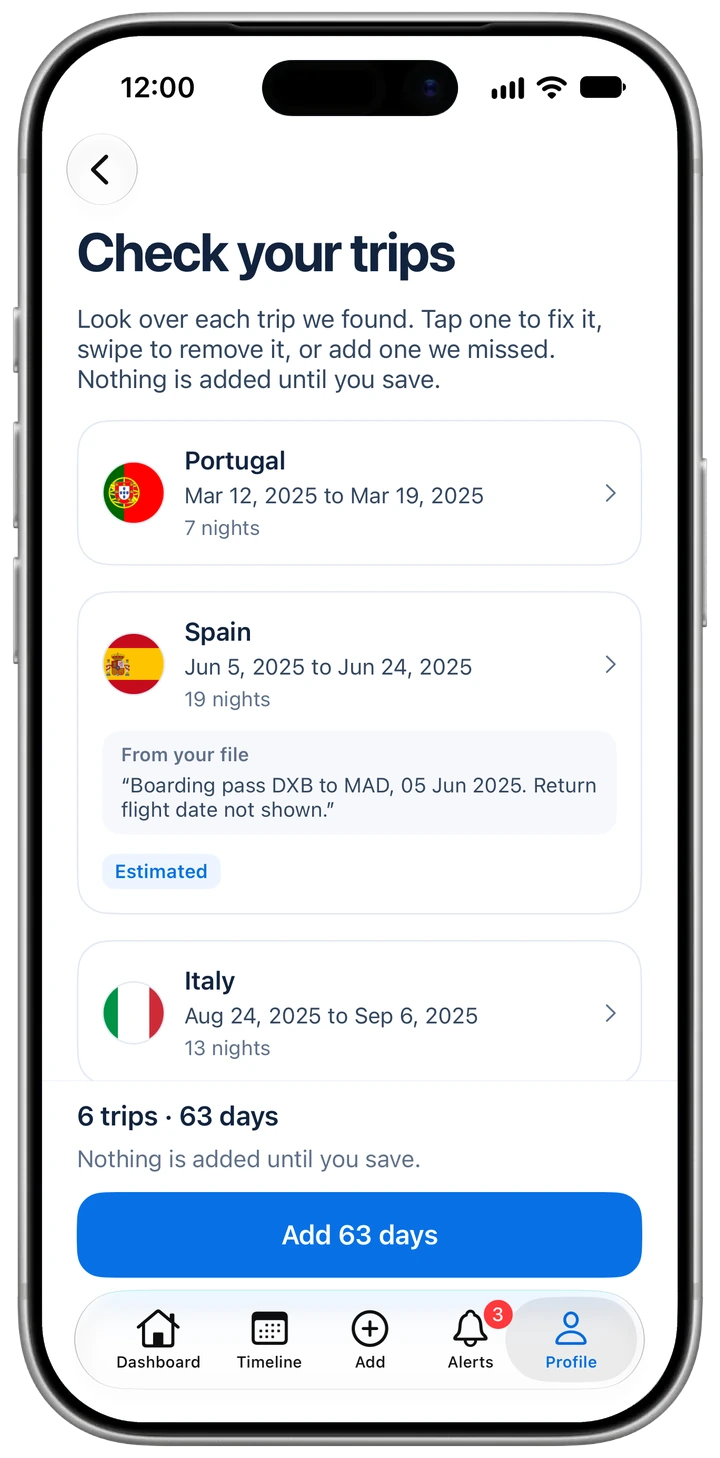
Rebuild your past travel from any file
Drop in itineraries, booking confirmations, a spreadsheet, a calendar file or a screenshot. iReside lists the trips it finds, and you check every one before it is saved, so the days before you installed the app become part of your record.
- PDF, Excel, CSV, calendar files and photos
- Edit or remove every trip before saving
- A Couldn't import list shows what was left out
- Days tracked with GPS are never replaced
Keep the proof behind your days
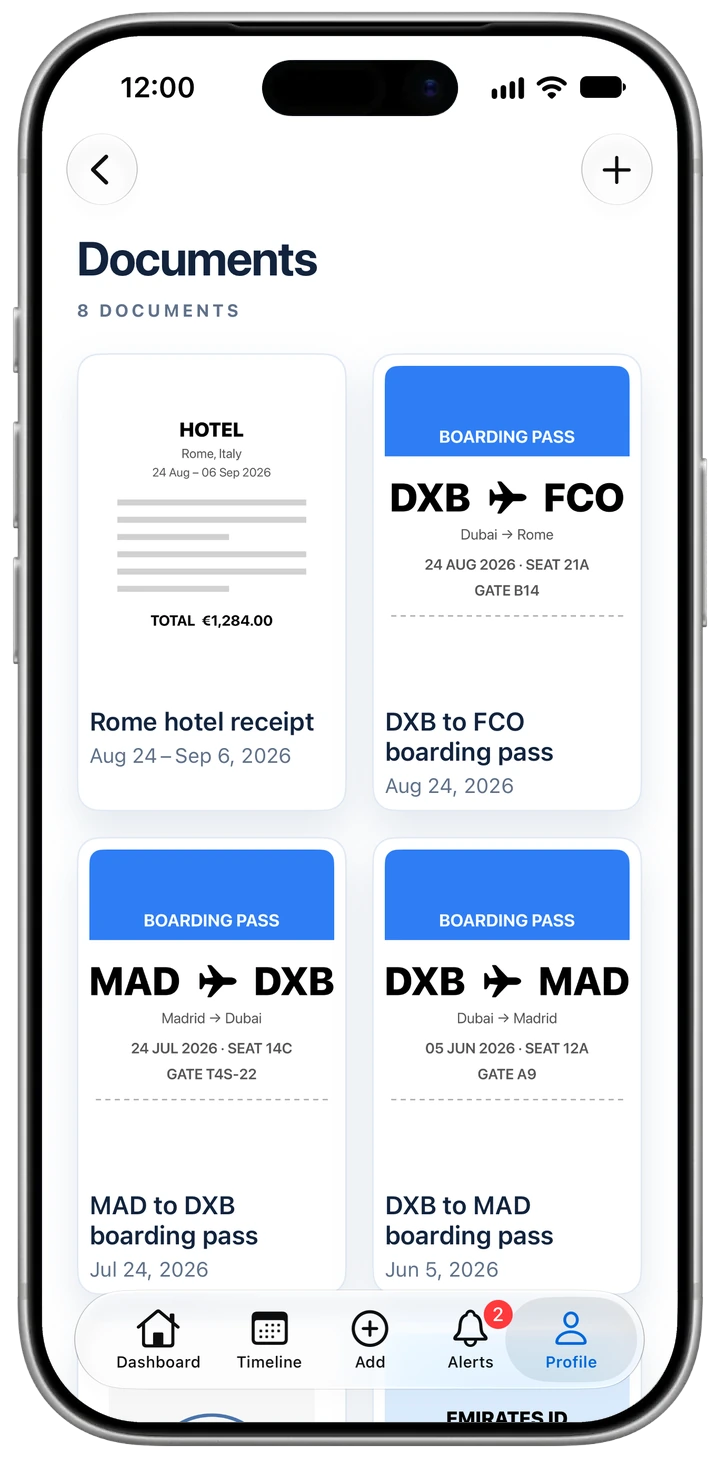
Scan passports, visas, boarding passes, entry stamps and receipts and tie each one to the days or tracker it supports. Your report can index them as numbered evidence, and each day cites the documents behind it.
- Scan, pick photos or choose a file
- Link to a day, a date range or a tracker
- Expiry alerts for passports, visas and permits
- Optional document index in your reports
A Second Screen for You and Your Advisor
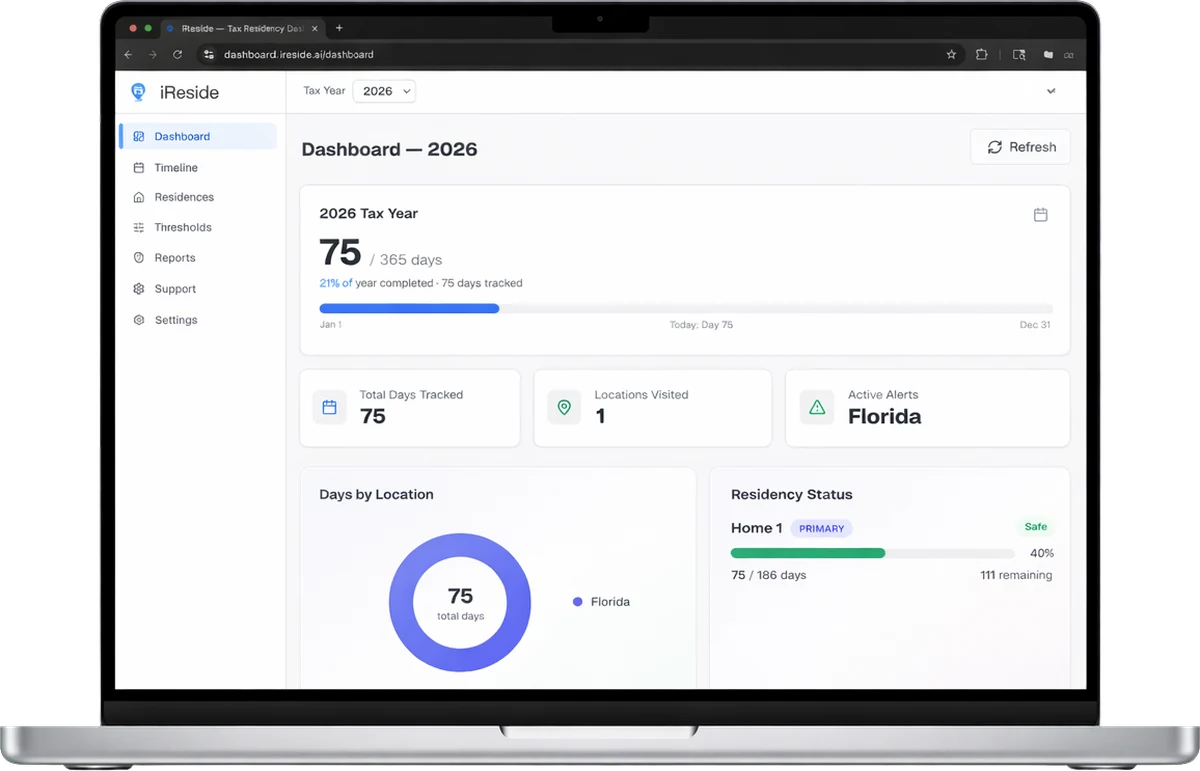
Open your record on a computer at dashboard.ireside.ai: a bigger view for you at your desk, and an easy way to walk your CPA, lawyer or assistant through your days.
Review It With Your Advisor
- Pull up your days, timeline and reports on a big screen in a meeting or on a screen share
- Go through each place's count and status together before you file
Hand Off the Paperwork
- Export the PDF report from your computer and send it to your CPA, lawyer or assistant
- They get the day-by-day record without needing your phone
The rules, in plain English
Free guides to every day-count rule iReside tracks, cited to the statutes and kept current.
State tax residency rules
How every US state decides who it gets to tax: 183-day rules, domicile tests, audit posture, and what it takes to leave.
Browse all statesVisa day limits & residency rules
Entry and stay limits, rolling windows, and the residency and citizenship clocks behind PR cards and passports.
Start with the question you are asking
- 183 day rule calculatorEnter your days by state and see which residency lines you are near.
- 183 day ruleWhich states use 183 days, which use another line, and which use none.
- Domicile proof checklistThe evidence that shows where your permanent home is, with a checklist.
- What is a declaration of domicileThe sworn statement of domicile, what it says and what it does not prove.
- Schengen calculator appA free calculator, and an app that counts your Schengen days for you.
Choosing a tax residency tracker app
Look for one that records your location automatically, because a record made at the time is far stronger in an audit than one rebuilt from memory. iReside counts every day by GPS in each US state and country, counts NYC separately from New York State, marks each day's source, lists missing days openly, ties your passports, visas and boarding passes to the days they prove, and exports the lot as a PDF or CSV report. That is why iReside is the best tax residency tracker app for audit-ready proof of where you were.
Yes. iReside runs in the background and counts each day in every US state you are in, with nothing to log by hand. Flyover states are ignored, a day in two states counts in both and is marked Travel Day in your report, and you can add planned trips to see your days before you travel.
It keeps a daily record of where you were and counts it against residency rules like the 183-day rule, the US Substantial Presence Test or the UK Statutory Residence Test day thresholds, so you can show a tax authority or an immigration officer where you were. iReside also tracks visa limits such as Schengen 90/180. It counts days and keeps the record; it is not tax advice.
Yes. iReside tracks 307 jurisdictions: 249 countries and territories, the US states and DC, US territories, New York City and Yonkers, with 130+ ready-made trackers for tax residency, visa and citizenship rules.
$44.99/year after free trial, or $4.99 a month. Cancel anytime.
Start Tracking Your Tax Residency and Visa Limits Today
Every day you track is a day you will not have to guess.